四、TacoAI 应用
先安装 tps-test 下载测试资源,命令如下:
sudo apt update && sudo apt install tps-test
测试资源位于 /usr/data 目录下:
root@em20-dk:~# ls /usr/data/
automation  dvfs    gpiozero   npu    suspend              vdec
ddr         ffmpeg  ids        otp    taco-pipeline-1.0.0  venc
deb         fio     libcv      qa     tps_pipeline
distro      gmac    multicore  sound  usb
4.1 编码
视频编码测试命令是 taco_venc_simple_example,主要用于将 YUV 数据编码成 H.264 数据。
测试资源为 /usr/data/venc/1920x1080_420p_10f.yuv(10 帧,1080P,YUV420p 格式数据)。使用说明如下:
taco_venc_simple_example -i <input_file> <threads> <cycles> <loops> <frames> <save> <pixformat> <pp>
常用选项说明:
| 选项 | 说明 | 默认值 |
|---|---|---|
-i <file> | 输入 YUV 视频文件路径 | /usr/data/venc/1920x1080_420p_10f.yuv |
-t <num> | 编码线程数(1‑32) | 1 |
-c <num> | 编码测试周期数(≥1) | 1 |
-l <num> | 每个周期的编码循环次数(≥1) | 1 |
-f <num> | 每个循环的编码帧数(≥1) | 10 |
-s <0/1> | 是否保存输出码流(0=否,1=是) | 1 |
-p <num> | 输入像素格式(0=YUV420P, 1=NV12, 2=NV21, …) | 0 |
-m <0/1> | 预处理模式(0=正常,1=启用) | 0 |
-h | 显示帮助信息 |
示例命令:
root@em20-dk:~# taco_venc_simple_example -t 4 -c 1 -l 1 -f 10 -s 1
TACO Video Encoder Configuration:
  Input file: /usr/data/venc/1920x1080_420p_10f.yuv
  Threads: 4
  Encoder cycles: 1
  Loops per encoder: 1
  Frames per loop: 10
  Save file: yes
  Pixel format: 0
  Pre-processing mode: disabled
  Total frames per thread: 10
TACO VENC Multi-threaded Test Configuration:
  Threads: 4
  Encoder cycles: 1
  Loops per encoder: 1
  Frames per loop: 10
  Save file: yes
  Pixel format: 0
  PP encode: no
  Total frames per thread: 10
Thread 3 - Cycle 1 - Loop 1: FPS: 40.95, Frames: 10, Streams: 10
Thread 1 - Cycle 1 - Loop 1: FPS: 53.63, Frames: 10, Streams: 10
Thread 3: Completed
Thread 1: Completed
Thread 2 - Cycle 1 - Loop 1: FPS: 46.16, Frames: 10, Streams: 10
Thread 0 - Cycle 1 - Loop 1: FPS: 35.68, Frames: 10, Streams: 10
Thread 2: Completed
Thread 0: Completed
All threads completed
输出文件名为 output_thread_0.h264、output_thread_1.h264、output_thread_2.h264、output_thread_3.h264。
输出日志解析:
- 编码配置:显示编码器配置信息,包括输入文件、线程数、编码周期、循环次数、帧数、保存选项等。
TACO Video Encoder Configuration:
  Input file: /usr/data/venc/1920x1080_420p_10f.yuv
  Threads: 4
  ...
TACO VENC Multi-threaded Test Configuration:
  Threads: 4
  ...
- 编码性能:每个线程在每个周期和循环中的编码帧率(FPS)、处理的帧数以及生成的码流文件数。
Thread 3 - Cycle 1 - Loop 1: FPS: 40.95, Frames: 10, Streams: 10
Thread 1 - Cycle 1 - Loop 1: FPS: 53.63, Frames: 10, Streams: 10
...
- 编码完成:所有线程编码完成后的提示。
All threads completed
4.2 解码
视频解码测试命令是 ppvdec,主要用于将 H.264、H.265 或 JPEG 数据解码成 YUV 或 RGB 数据。测试资源位于 /usr/data/vdec 目录下。使用说明如下:
ppvdec decode_mode <线程数> <循环次数> <解码周期> <帧数> <保存文件> [解码类型] [分辨率] [PP模式]
参数说明:
线程数:解码线程数量(1-32)循环次数:外层循环数量解码周期:每个线程的解码循环数量帧数:每轮循环需要解码的帧数保存文件:1 = 保存 YUV 文件,0 = 不保存解码类型:0 = H.264,1 = H.265分辨率:0 = 1080p,1 = 4KPP模式:0 = 仅 PP0,1 = 仅 PP1,2 = 双通道
示例命令:
root@em20-dk:~# ppvdec decode_mode 1 1 1 10 1 0 0 0
Signal handlers installed (SIGINT, SIGTERM)
=== [ppvdec running from test_taco_vdec.c] ===
=== Legacy Mode Configuration ===
  Codec: H.264
  Resolution: 1080p
  PP Channel: Channel0 only
  Save YUV: Enabled
  Stream Files Used:
    H.264 1080p: /usr/data/vdec/stream_1920x1080.h264
    H.264 4K:    /usr/data/vdec/stream_3840x2160.h264
    H.265 1080p: /usr/data/vdec/stream_1920x1080.h265
    H.265 4K:    /usr/data/vdec/stream_3840x2160.h265
Starting single decode thread (no pthread)...
Thread 1 - PP Channel Configuration: mode=0, ch0=enabled, ch1=disabled
Thread 1 - Parsing stream file: /usr/data/vdec/stream_1920x1080.h265
Parsing H.265 /HEVC format
Parsed 1000 frames from video file
Thread 1 Loop 1: FPS: 2.63
Thread 1: 1 frames, FPS: 2.61
PASS
输出日志解析:
- 解码线程配置:显示每个线程的配置信息,包括模式和通道状态。
Thread 1 - PP Channel Configuration: mode=0, ch0=enabled, ch1=disabled
Thread 1 - Parsing stream file: /usr/data/vdec/stream_1920x1080.h264
- 帧解析:显示从视频文件中解析的帧数。
Parsed 1000 frames from video file
- 解码性能:显示每个线程的解码帧率(FPS)。
Thread 1 Loop 1: FPS: 2.63
Thread 1: 1 frames, FPS: 2.61
4.3 NPU 模型运行
本例程基于官方 YOLO11 模型,经过优化和适配,可在 EM20-DK 硬件平台上高效运行,用于实现对 80 种常见物体的实时检测。本例程提供的预编译模型为 INT8 量化模型(.nb 格式),旨在平衡检测精度与推理速度。项目代码通过 taRuntime 加载并执行 .nb 模型,利用 OpenCV 进行图像的预处理和后处理。
4.3.1 测试环境准备
准备一台 PC 作为 host 机,并配备 Ubuntu 系统和 Python 环境。EM20-DK 平台作为 device 机,已预装 Ubuntu 系统和 SDK。
访问 Model Zoo 官方 Gitee 或 Model Zoo 官方 Github,下载官方提供的算法示例。
以 YOLO11 模型为例,通过运行 samples/YOLO11_det/scripts/ 目录下的 download.sh 脚本,获取例程所需的模型、数据与脚本等内容。
chmod +x download.sh && ./download.sh
下载内容:
models/
├── datasets.txt
├── yolo11s_float16.nb
├── yolo11s.onnx
├── yolo11s_int8.nb
├── yolo11s_config_fp16.json
└── yolo11s_config_int8.json
test_images/  # 测试用图片
├── input1.jpg
├── input2.jpg
├── input3.jpg
├── input4.jpg
└── input5.jpg
datasets/
├── val2017_1000  # coco val2017中随机抽取的1000张样本
└── instances_val2017_1000.json # coco val2017中随机抽取的1000张样本对应的标注信息
通过 TACO SDK 搭建交叉编译环境,使用交叉编译工具链编译生成可执行文件 yolo11s_det_soc:
cd cpp
mkdir build && cd build
cmake ..
make
在 EM20-DK 板端新建模型文件夹 yolo11,并通过 scp 命令将数据从 host 机复制到该目录下,复制完成后 yolo11 目录结构如下:
yolo11
├── test_images    # 测试集图片
│   ├── input1.jpg
├── models
│   └── yolo11s_int8.nb   # .nb 模型
|   └── yolo11s_float16.nb
└── yolo11s_det_soc # 例程程序
4.3.2 单图推理
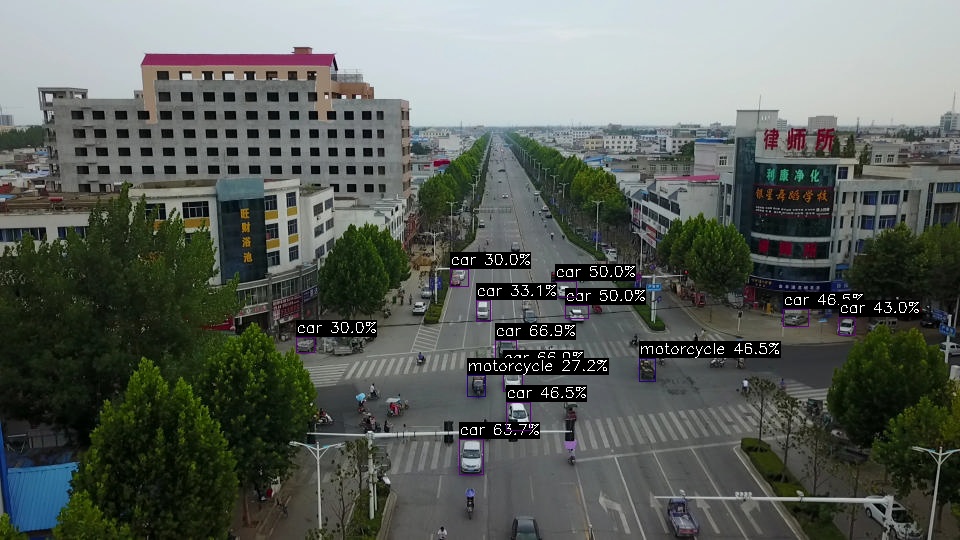
YOLO11s INT8 模型
在 yolo11 目录下运行 INT8 模型:
root@em20-dk:~/yolo11# ./yolo11s_det_soc --input=test_images/input1.jpg --model=models/yolo11s_int8.nb
--------------------------------------
Single Image Inference Mode
Model: models/yolo11s_int8.nb
Input: test_images/input1.jpg
Output: output.jpg
Conf thresh: 0.25
NMS thresh: 0.45
--------------------------------------
Input num: 1, Output num: 3
--------------------------------------------------------------
    Tensor Attribute index:      |  0
    dim_count:                   |  4
    dim_size:                    |  [640, 640, 3, 1]
    data_format:                 |  3
    quant_format:                |  2
    quant_data (dfp):
        fixed_point_pos:         |  998277230
    quant_data (affine):
        tf_scale:                |  0.003922
        tf_zero_point:           |  -128
    name:                        |  uid_30000_out_0
--------------------------------------------------------------
--------------------------------------------------------------
    Tensor Attribute index:      |  0
    dim_count:                   |  3
    dim_size:                    |  [6400, 144, 1]
    data_format:                 |  3
    quant_format:                |  2
    quant_data (dfp):
        fixed_point_pos:         |  1044353412
    quant_data (affine):
        tf_scale:                |  0.187079
        tf_zero_point:           |  23
    name:                        |  uid_30001_out_0
--------------------------------------------------------------
--------------------------------------------------------------
    Tensor Attribute index:      |  1
    dim_count:                   |  3
    dim_size:                    |  [1600, 144, 1]
    data_format:                 |  3
    quant_format:                |  2
    quant_data (dfp):
        fixed_point_pos:         |  1048615530
    quant_data (affine):
        tf_scale:                |  0.251178
        tf_zero_point:           |  66
    name:                        |  uid_30002_out_0
--------------------------------------------------------------
--------------------------------------------------------------
    Tensor Attribute index:      |  2
    dim_count:                   |  3
    dim_size:                    |  [400, 144, 1]
    data_format:                 |  3
    quant_format:                |  2
    quant_data (dfp):
        fixed_point_pos:         |  1046139268
    quant_data (affine):
        tf_scale:                |  0.213691
        tf_zero_point:           |  70
    name:                        |  uid_30003_out_0
--------------------------------------------------------------
Model initialized successfully
--------------------------------------
Detected 16 objects

===== Time Statistics =====
Image read time:    113.72 ms
Preprocess time:    89.49 ms
Inference time:     15.48 ms
Postprocess time:   57.66 ms
Total time:         276.36 ms
============================
Output saved to: output.jpg
--------------------------------------
Model deinitialized
输出日志解析:
- 使用模型:models/yolo11s_int8.nb
- 输入图像:test_images/input1.jpg(input1.jpg 可换成自定义 jpg 文件)
- 输出图像:output.jpg
- 输入图像的尺寸:640x640 像素(预处理后)
- 性能统计:
- 读图+解码: 113.72 ms,占比 44.19%
- 预处理:89.49 ms,占比 33.05%
- npu推理:15.48 ms,占比 5.07%
- 后处理:57.66 ms,占比 20.05%
- 总耗时:276.36 ms
- 检测结果:共 16 个对象,置信度 ≥ 0.25
- Inference FPS:≈ 64.6 fps(1000/15.48)
- 端到端 FPS:≈ 3.6 fps(1000/276)
- 状态:PASS
生成结果
YOLO11s FP16 模型
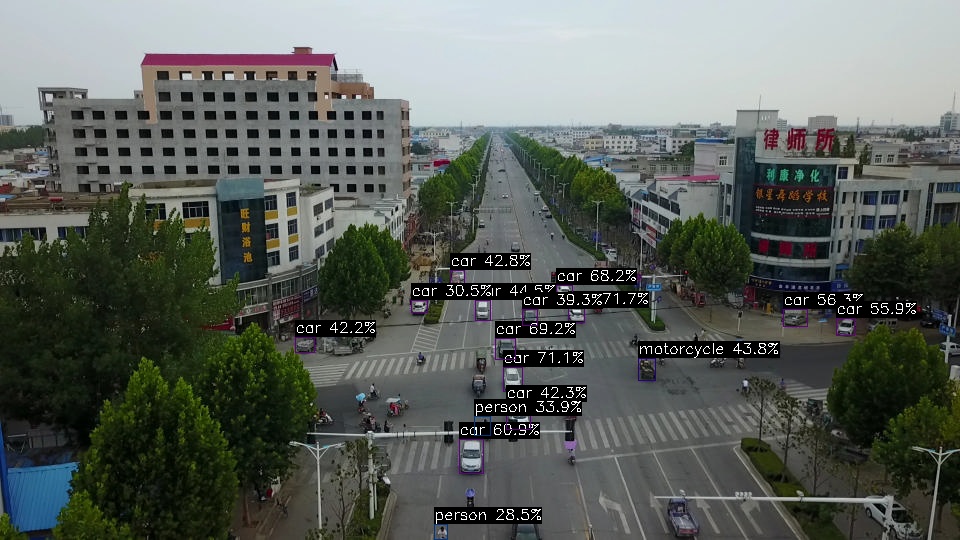
在 yolo11 目录下运行 FP16 模型:
root@em20-dk:~/yolo11# ./yolo11s_det_soc --input=test_images/input1.jpg --model=models/yolo11s_float16.nb
--------------------------------------
Single Image Inference Mode
Model: models/yolo11s_float16.nb
Input: test_images/input1.jpg
Output: output.jpg
Conf thresh: 0.25
NMS thresh: 0.45
--------------------------------------
Input num: 1, Output num: 3
--------------------------------------------------------------
    Tensor Attribute index:      |  0
    dim_count:                   |  4
    dim_size:                    |  [640, 640, 3, 1]
    data_format:                 |  1
    quant_format:                |  0
    quant_data (dfp):
        fixed_point_pos:         |  0
    quant_data (affine):
        tf_scale:                |  0.000000
        tf_zero_point:           |  0
    name:                        |  input/output[0]
--------------------------------------------------------------
--------------------------------------------------------------
    Tensor Attribute index:      |  0
    dim_count:                   |  3
    dim_size:                    |  [6400, 144, 1]
    data_format:                 |  1
    quant_format:                |  0
    quant_data (dfp):
        fixed_point_pos:         |  0
    quant_data (affine):
        tf_scale:                |  0.000000
        tf_zero_point:           |  0
    name:                        |  uid_5_out_0
--------------------------------------------------------------
--------------------------------------------------------------
    Tensor Attribute index:      |  1
    dim_count:                   |  3
    dim_size:                    |  [1600, 144, 1]
    data_format:                 |  1
    quant_format:                |  0
    quant_data (dfp):
        fixed_point_pos:         |  0
    quant_data (affine):
        tf_scale:                |  0.000000
        tf_zero_point:           |  0
    name:                        |  uid_4_out_0
--------------------------------------------------------------
--------------------------------------------------------------
    Tensor Attribute index:      |  2
    dim_count:                   |  3
    dim_size:                    |  [400, 144, 1]
    data_format:                 |  1
    quant_format:                |  0
    quant_data (dfp):
        fixed_point_pos:         |  0
    quant_data (affine):
        tf_scale:                |  0.000000
        tf_zero_point:           |  0
    name:                        |  uid_3_out_0
--------------------------------------------------------------
Model initialized successfully
--------------------------------------
Detected 16 objects

===== Time Statistics =====
Image read time:    90.98 ms
Preprocess time:    44.19 ms
Inference time:     24.61 ms
Postprocess time:   51.13 ms
Total time:         210.91 ms
============================
Output saved to: output.jpg
--------------------------------------
Model deinitialized
输出日志解析:
- 使用模型:models/yolo11_float16.nb
- 输入图像:test_images/input1.jpg(input1.jpg 可换成自定义 jpg 文件)
- 输出图像:output.jpg
- 输入图像的尺寸:640x640 像素 (预处理缩放后)
- 性能统计:
- 读图+解码:90.98 ms,占比 44.19%
- 预处理:44.19 ms,占比 44.19%
- npu推理:24.61 ms,占比 24.61%
- 后处理:51.13 ms,占比 51.13%
- 总耗时:210.91 ms
- 检测结果:共 16 个对象(置信度 ≥ 0.25)
- Inference FPS:≈ 40.7 fps(1000/24.61)
- 端到端FPS:≈ 40.7 fps
- 状态:pass
生成结果
4.3.3 模型性能评测
基于单图推理测试结果,我们进行了性能对比分析:
性能对比表格
| 模型名称 | 输入图像 | 输出图像 | 读码解码时间(ms) | 预处理时间(ms) | NPU推理时间(ms) | 后处理时间(ms) | 总耗时(ms) | 推理FPS | 端到端FPS |
|---|---|---|---|---|---|---|---|---|---|
| YOLO11s INT8 | input1.jpg | output.jpg | 113.72 | 89.49 | 15.48 | 57.66 | 276.36 | 64.6 | 3.6 |
| YOLO11s FP16 | input1.jpg | output.jpg | 90.98 | 44.19 | 24.61 | 51.13 | 210.91 | 40.6 | 4.7 |
性能分析
- NPU 推理性能:INT8 模型推理耗时仅 15.48 ms,相比 FP16 模型的 24.61 ms 提升了约 59%,INT8 量化在 NPU 上优势明显。
- 端到端性能:尽管 INT8 推理更快,但整体端到端耗时(276.36 ms)反而高于 FP16(210.91 ms),主要原因是 INT8 版本在图像读码解码和预处理阶段耗时较多(合计 203.21 ms,占 73.5%)。这使得 FP16 的端到端 FPS(4.7 fps)反而高于 INT8(3.6 fps)。
- 瓶颈定位:无论 INT8 还是 FP16,前后处理时间占总耗时的 80% 以上(INT8 为 88%,FP16 为 80%),说明当前 pipeline 的瓶颈在于图像读码、预处理和后处理阶段。后续优化应聚焦于 DMA-BUF 零拷贝、多线程流水线以及降低输入分辨率等方法,以进一步提升端到端性能。
结论
- INT8 量化在 NPU 推理速度上具有显著优势(+59%),适合对单帧推理延迟敏感的应用。
- 端到端整体性能受前后处理制约较大,FP16 模型因预处理时间更短而获得更高的整体帧率。
- 后续工作需重点优化数据流 pipeline,以充分发挥 NPU 的算力潜力。